Sunday, December 31, 2006

Migrate from Windows XP to Windows Vista Business

No risk, no fun - that's maybe a good advise in adventures sports, but seldom in software "projects". But... it's xmas-time, angels will support me in migrating my system to Windows Vista...

So I updated my exisiting XP-Installation thru the Installer-Wizard to the new MS-OS. Beside from problems with most of my existing drivers, more or less everything was still running after the Update...

Today, I tried to install SQL Server 2005 Standard Edition. But the Installer told me, SQL Server is already installed (from my previous installation under XP). So I decided to uninstall the existing old, dead SQL Server XP Version. Via "ControlPanel - Programs and Features" (yes, no more "Add and Remove Software") I tried to find SQL Server.... but there was no entry visible.... grmpf.

So I manually remove SQL Server (remember.... "No risk, no fun") the real dirty way:
  • stopping and uninstalling services
  • deleting files, folders, start menu entries
  • deleting registry entries
... and restarted the SQL Server Setup.... Next next next .... and is up and running now!
--> Holly ghost, xmas is here :-)

For a serious way to remove SQL Server 2005 manually, I recommend the following article (which I found after the hack I've done....):
Happy new Year 2007!

Wednesday, October 25, 2006

Change default View Source editor in IE

Do you want to change your default "View Source" editor inside Internet Explorer? - Here is the howto: http://dotnet.org.za/thea/archive/2004/11/25/7933.aspx


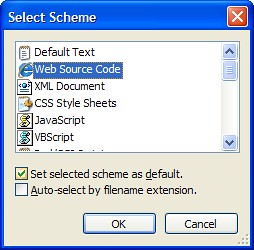
If you have configured Notepad2 as Source Code Editor, the following option will set Web Code Syntax Highlighting by default:

Firefox 2.0 RC3 Features

FF 2.0 is coming soon (feature list here). This release will implement Javascript 1.7 with some nice language enhancements.

JavaScript 2.0 / ECMAScript 4 will not be out there the next years according to this presentation. More Information on Wikipedia.

Geotagging

Geotagging is the process of adding geographical identification metadata to various media such as websites, blogs, or images. This data usually consists of latitude and longitude coordinates, though it can also include altitude and place names.

For example you can Geotag your flickr-images. Explore posted images by location: http://flickr.com/map

Or Geotag your Blog. Here is a step by step guide. Using FeedMap (Blogs + Maps) you can Geotag your blog, browse already geo-coded blogs and search for blogs. Once geo-coded, you can get your own BlogMap location using a simple url that allows you to network with your local bloggers. - Pretty cool stuff.

My coordinates (Lat-Long) are: 47.38 (47°22') 7.994 (7°59')

Saturday, October 14, 2006

iPod nano with accessorie iTrip...

Today, I bought a cool flat iPod nano with 2 gigs memory. - As an add-on, I purchased a compatible iTrip nano, a FM transmitter for iPod nano.

So back home, I loaded my new iPod with music thru iTunes. Everything worked as expected. But then, I tried to connect the iPod nano with the iTrip Hardware.....


grmpf... *uck.... unbelivable, it's just UNBELIVABLE. The hardware does not match!!! The FM transmitter for iPod nano does not phyically match to the iPod nano interface. Really frustrating. How stupid is this?!

I have to go back to the seller...

DeskTask - MS Oulook Infos on your desktop

Managers, pay attention, watch out! - MS Outlook taks and appointments on your desktop for free with DeskTask - http://www.carthagosoft.net/desktask.htm

Thursday, October 05, 2006

Simpson seasons online

All Simpson seasons available over the internet!

The US-Comic Simpson, created by Matt Groening, does accompany a family consisting of Homer, Marge, Bart, Lisa und Maggie Simpson thru their daily life. This serie exists over 20 years and got numerous awards, e.g. a star on the Hollywood Walk of Fame .


http://tvlinks.50webs.com/

Monday, October 02, 2006

Orcas September CTP available

Orcas September CTP - next generation development tool for Windows Vista, the 2007 Office System and the Web is available as Virtual PC.

Saturday, September 23, 2006

BLINQ! Web-Application generated

BLINQ is a scaffolding tool, available from the ASP.NET Sandbox Platform.
In this post, I'll try to explain details about BLINQ, especially

  • the idea
  • architecture and code generation
  • the webforms
  • summary

Idea

With the command line tool BLINQ, you can generate a Web-Application on the basis of an exisiting database schema. The resulting application does allow managing the data: select, insert, update and deletes. The relations between the data are used for navigation purposes and for foreign-key lookups.

So the idea is not really idea, but powerful in combination with ASP.NET. Let's see....

BLINQ is an abbreviation for WeB Language INtegrated Query, according to the naming pattern BLOG (WeB LOG). LINQ, the upcomming technology for universal, next generation data access is responsible to query and save the data thru objects. More details about LINQ, you will find on Scott's Blog and inside the official Linq Project Page.

Architecture and Code Generation
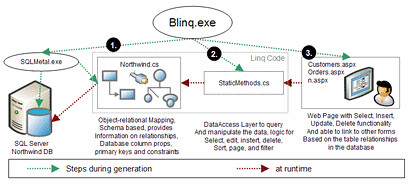

(Click the image to enlarge)


Step 1:


BLINQ needs database schema metadata (what a surprise :-). With the LINQ May CTP, the command line tool SQLMetal is installed, which is internal used by BLINQ to generate the necessary information and general data access classes.

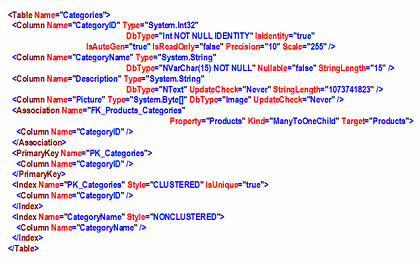
For example, you can call SQLMetal manually to get metadata as xml:

sqlmetal.exe /server:.\sql2k5 /database:northwind /xml:northwind.xml

The resulting file looks like this (this is just the fragment for the northwind category table):

An other way to call SQLMetal:

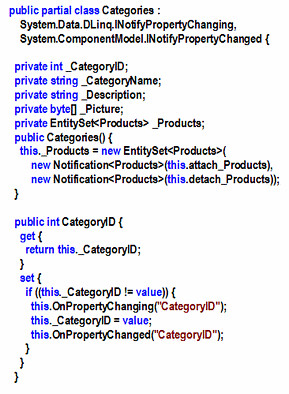
sqlmetal.exe /server:.\sql2k5 /database:northwind /xml:northwind.cs

The result is a complete data access via LINQ (here's an other fragment):
Step 2:

After generating the general data access thru SQLMetal, BLINQ does generate more specific methods to query and update the backend. These methods are located inside the file StaticMethods.cs. If you call BLINQ with the parameter /pageDataSource, this methods are generated direct into the code-beside files.

Step 3:

The last step: BLINQ does generate WebForms, according the meta informations. For each table inside the database, BLINQ does generate three forms:

  • TableName.aspx
    A list of all records (GridView) including sorting, paging, navigation, editing and deletes.

  • NewTableName.aspx
    A single record view (DetailView) to add new data.

  • TableNameDetail.aspx
    A single record view (DetailView) to edit the data.

As an other example, the northwind tables "Customers" and "Orders" (parent-child relation) are visualized here:


The resulting forms and navigation here (technical view):


WebForms

Here you can see Order Detail WebForm, generated by Blinq:
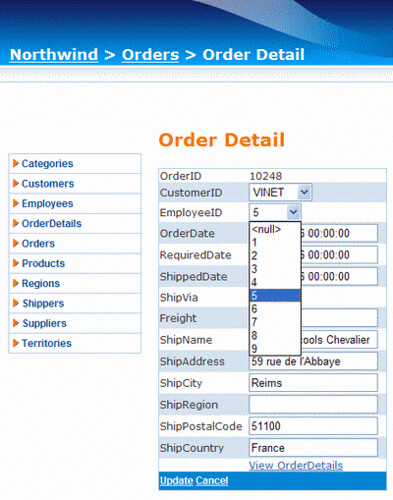
BLINQ does profit from the new ASP.NET 2.0 components and mechanism:
  • Layout is styled via MasterPage and Theme
  • Navigation does use Menu Control and SiteMap
  • Breadcrump thru the SiteMapPath Control
  • List with the GridView Control
  • Single Record with the DetailView Control
  • Business Object are accessed thru ObjectDataSource
  • Page methods thru the new PageDataSource

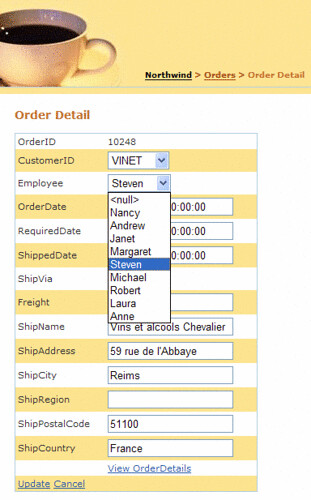
This fact is great and brings the advantage, that we can use your existing skills and knowledge of ASP.NET to customize the generated forms. By just changing the theme a bit and by changing the Employee Dropdown Fields DisplayValue, you can get the following customized result:

Summary

The first BLINQ Preview is available since June 06.

Naturally, there are several features missing in the current version, e.g. :

  • No validation inside Grid- and DetailView (e.g. required fields, validator according data type)
  • No editors (e.g. for DateTime fields)
  • No Ajax Support
  • No Designer Support
  • Limited templating
  • "Just" SQLServer 2000, -2005, -2005 Express Support

Polita Paulus, THE BLINQ Developer, is an active poster at the BLINQ Forum. She is responsible for the GridView, DataView and FormView ASP.NET as well.

BLINQ is useful for

  • prototyping
  • web-based data-table administration
  • as a starting point for more complex application
  • learning ASP.NET 2.0

The combination "robust and complex Web Framework (= ASP.NET)" with "Code Generation" is powerful. I looking forward to the next release.

Thursday, September 21, 2006

MS AJAX Library and Personalization

Just wrote an article about howto use ASP.NET 2.0 Profile Services together with MS AJAX Library (aka Atlas Client-Framework) including Demo-Project.

Interested? - http://www.codeproject.com/useritems/AtlasAjaxProfile.asp