Saturday, September 23, 2006

BLINQ! Web-Application generated

BLINQ is a scaffolding tool, available from the ASP.NET Sandbox Platform.
In this post, I'll try to explain details about BLINQ, especially

  • the idea
  • architecture and code generation
  • the webforms
  • summary

Idea

With the command line tool BLINQ, you can generate a Web-Application on the basis of an exisiting database schema. The resulting application does allow managing the data: select, insert, update and deletes. The relations between the data are used for navigation purposes and for foreign-key lookups.

So the idea is not really idea, but powerful in combination with ASP.NET. Let's see....

BLINQ is an abbreviation for WeB Language INtegrated Query, according to the naming pattern BLOG (WeB LOG). LINQ, the upcomming technology for universal, next generation data access is responsible to query and save the data thru objects. More details about LINQ, you will find on Scott's Blog and inside the official Linq Project Page.

Architecture and Code Generation


(Click the image to enlarge)


Step 1:


BLINQ needs database schema metadata (what a surprise :-). With the LINQ May CTP, the command line tool SQLMetal is installed, which is internal used by BLINQ to generate the necessary information and general data access classes.

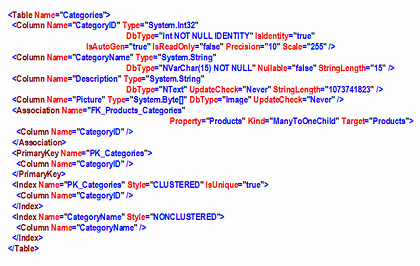
For example, you can call SQLMetal manually to get metadata as xml:

sqlmetal.exe /server:.\sql2k5 /database:northwind /xml:northwind.xml

The resulting file looks like this (this is just the fragment for the northwind category table):

An other way to call SQLMetal:

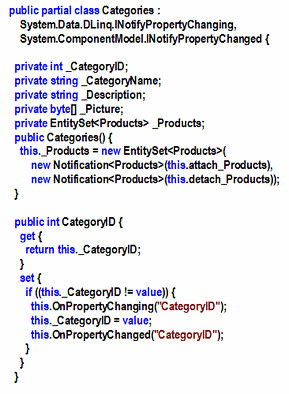
sqlmetal.exe /server:.\sql2k5 /database:northwind /xml:northwind.cs

The result is a complete data access via LINQ (here's an other fragment):
Step 2:

After generating the general data access thru SQLMetal, BLINQ does generate more specific methods to query and update the backend. These methods are located inside the file StaticMethods.cs. If you call BLINQ with the parameter /pageDataSource, this methods are generated direct into the code-beside files.

Step 3:

The last step: BLINQ does generate WebForms, according the meta informations. For each table inside the database, BLINQ does generate three forms:

  • TableName.aspx
    A list of all records (GridView) including sorting, paging, navigation, editing and deletes.

  • NewTableName.aspx
    A single record view (DetailView) to add new data.

  • TableNameDetail.aspx
    A single record view (DetailView) to edit the data.

As an other example, the northwind tables "Customers" and "Orders" (parent-child relation) are visualized here:


The resulting forms and navigation here (technical view):


WebForms

Here you can see Order Detail WebForm, generated by Blinq:
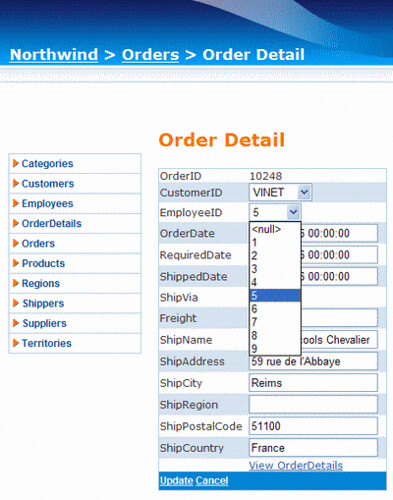
BLINQ does profit from the new ASP.NET 2.0 components and mechanism:
  • Layout is styled via MasterPage and Theme
  • Navigation does use Menu Control and SiteMap
  • Breadcrump thru the SiteMapPath Control
  • List with the GridView Control
  • Single Record with the DetailView Control
  • Business Object are accessed thru ObjectDataSource
  • Page methods thru the new PageDataSource

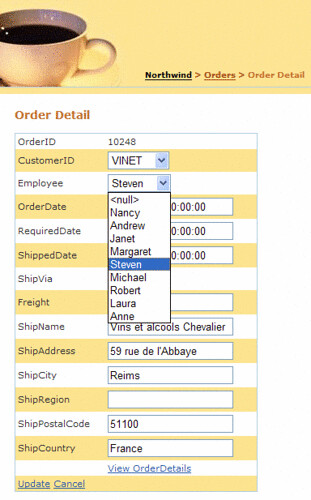
This fact is great and brings the advantage, that we can use your existing skills and knowledge of ASP.NET to customize the generated forms. By just changing the theme a bit and by changing the Employee Dropdown Fields DisplayValue, you can get the following customized result:

Summary

The first BLINQ Preview is available since June 06.

Naturally, there are several features missing in the current version, e.g. :

  • No validation inside Grid- and DetailView (e.g. required fields, validator according data type)
  • No editors (e.g. for DateTime fields)
  • No Ajax Support
  • No Designer Support
  • Limited templating
  • "Just" SQLServer 2000, -2005, -2005 Express Support

Polita Paulus, THE BLINQ Developer, is an active poster at the BLINQ Forum. She is responsible for the GridView, DataView and FormView ASP.NET as well.

BLINQ is useful for

  • prototyping
  • web-based data-table administration
  • as a starting point for more complex application
  • learning ASP.NET 2.0

The combination "robust and complex Web Framework (= ASP.NET)" with "Code Generation" is powerful. I looking forward to the next release.

Thursday, September 21, 2006

MS AJAX Library and Personalization

Just wrote an article about howto use ASP.NET 2.0 Profile Services together with MS AJAX Library (aka Atlas Client-Framework) including Demo-Project.

Interested? - http://www.codeproject.com/useritems/AtlasAjaxProfile.asp

Monday, September 18, 2006

Restoring VS.NET 2005 Smart Tags...

.. after installing the C# Language Service (LINQ Preview May 2006)? You see the Smart Tag, but as soon as you click on the down-arrow to get the wizard or option list, the Smart Tag just disapears? - Annoying!! Here is the fix:

http://forums.microsoft.com/MSDN/ShowPost.aspx?PostID=419975&SiteID=1

XML Notepad - New Release

Nice litte Tool from Microsoft: XML Notepad. A slick and slim alternative to Altova XMLSpy or VS2005 XMLEditor.

It does support:
  • Browsing XML
  • Instant schema validation
  • Intellisense according XSD
  • Undo/Redo
  • much more
Design is documented, Source Code is included, Tool is written in C# 2.0 and does use intensively System.Xml.

To get the code up and running in VS 2005 Solution, do the following:
  • Open XmlNotePad.sln
  • Delete Projects not needed (reduce to the max :-)
    - I just use Projects "Application", "Help" and "XMLNotePad"
  • Delete reference to not existing *.snk file (thru Project-Properties, Signing, disable "Sign the assembly")
  • Add a reference to the libraries XmlDiffPatch.dll and XmlDiffPatch.View.dll to Project "XMLNotepad"
  • Set Project "Application" as Startup
  • Run
Now, the solution should run without trouble.

Saturday, September 16, 2006

Web Client Software Factory

Microsofts Pattern & Practices Team has released a first Version of Web Client Software Factory. A Version for Smart Clients does exist as well.

Guidance and best practices how-to implement Applications End-to-End. WCSF does/will use techniques like ASP.NET AJAX, WF.

Both Factories are in eary stages.

Thursday, August 31, 2006

Syndication Icons

Identify synicated content with the standard icons. Harmonize - Customize - Stanardize:


But where do I find the official icon for ATOM ?

Saturday, August 26, 2006

Profile your SQL Express 'User Instance'

In the free SQL Server 2005 Express Edition , you get a new connection string parameter 'User instance=true'.

"data source=.\SQLEXPRESS;Integrated Security=SSPI;
AttachDBFilename=|DataDirectory|people.mdf;User Instance=true"


When this parameter is specified, SQL Express will create another instance of the sqlservr.exe process on the client. This process is running in the security context of the currently logged on user. The connection object passed back to the client is connected to this new user child instance, running as a client process in the user's security context.

More details about User Instances? Read this excellent article on msdn: Working with User Instances

SQL Profiler

For monitoring purposes (what's going on under the hood, troubleshooting and more), the SQL Server Profiler acts as a big time safer. The Profiler is able to read and display all the traffic between the client (e.g. a custom-application, SQL Management Studio etc.) and the SQL Server. Just attach the Profiler to a running SQL Server instance.

But how to attach to a 'user instance', where you don't have a well known instance name?

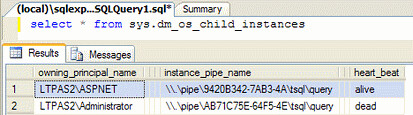
First, query the master database from SQL Express as follows:


There you get the named pipes per instance. You get the heart-beat as well: alive or dead (if the Lifetime of a User Instance Connection has timed out; default is 60 minutes).

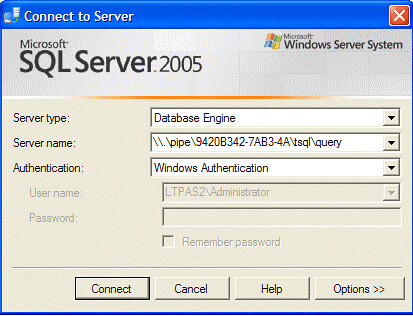
Second, connect with the pipe (just alive instances can be connected):


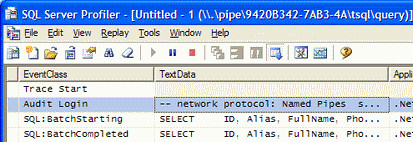
Third, get the traffic, sniff, profile...


You get the Profiler together with Workgroup-, Standard- and Enterprise edition.

SQL Server Management Studio / SQL Server Management Express

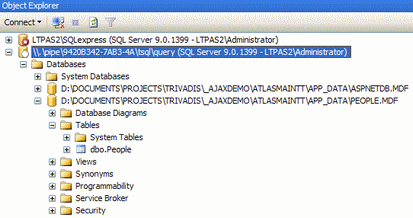
This solution will work for SQL Server Management Studio as well:


The Management Studio does display all attached Databases(in my case AspNetDB.MDF and People.MDF). - There is the free Version SQL Server Management Studio Express.

Searching for a used string?

... then checkout this page http://www.connectionstrings.com/ ;~)